Honeywell Thermostat Buying Guide: How to Choose the Right Model for Your Home
8 min read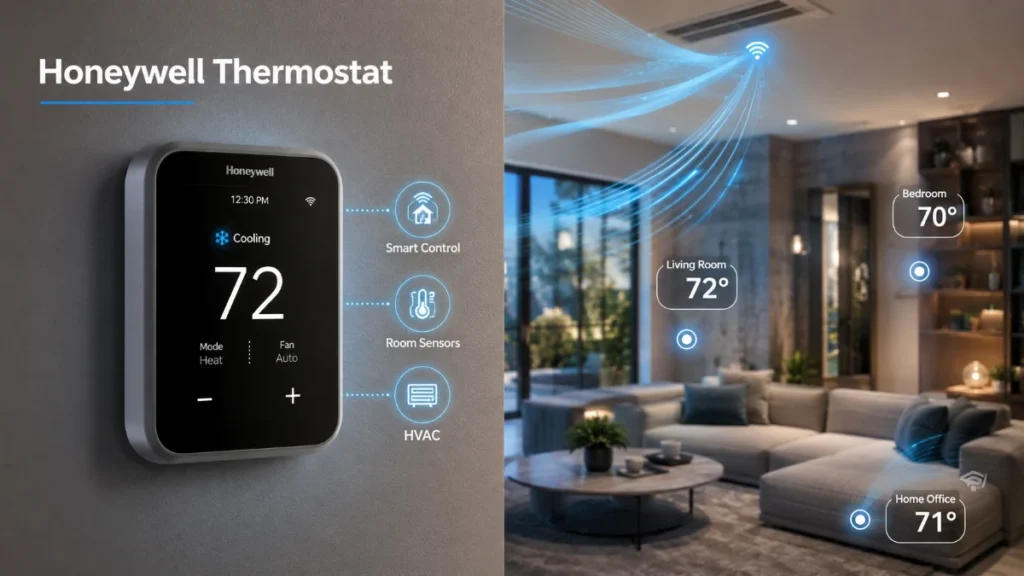
A Honeywell thermostat can range from a straightforward programmable controller to an advanced smart thermostat with room sensing, occupancy detection, indoor air quality controls, and connected home integration. The right choice depends less on having the most features and more on whether the thermostat matches your HVAC system and solves a real problem in your home.
Honeywell Home is the residential thermostat brand associated with Resideo. Its current lineup includes newer X-Series models such as the X7S and X8S, alongside established T-Series products such as the T9 and T10+ Pro. Because specifications differ between models, choosing by exact model number is more reliable than choosing by brand name alone.
If you are replacing an existing thermostat, start with compatibility. Then decide whether you actually need remote control, room sensors, advanced HVAC management, or smart-home integration.
The Best Honeywell Thermostat Depends on Your HVAC System
There is no single model that is best for every household. A thermostat designed for a standard low-voltage system may be unnecessary for a simple setup but inadequate for a more complicated heat pump or accessory-rich HVAC system.
Before comparing models, identify:
- Conventional furnace and air conditioning or heat pump
- Number of heating stages
- Number of cooling stages
- Auxiliary or emergency heat
- C-wire availability
- Humidifier, dehumidifier, or ventilator controls
- Zoning equipment
- Wi-Fi requirements
- Smart-home platform requirements
Honeywell Home provides a wiring compatibility checker to determine which thermostats can work with existing wiring.
A Simple Buyer-Match Framework
| If your priority is… | Look at… | Why |
| Modern connected control | X7S | Smart scheduling, occupancy detection and optional room sensors |
| Advanced comfort and air-quality control | X8S | Room sensing, IAQ features and broader HVAC support |
| Uneven room temperatures | T9 | Smart Room Sensors and room prioritization |
| Advanced professionally configured HVAC | T10+ Pro | RedLINK sensors and broader HVAC configuration |
| Basic temperature scheduling | Programmable Honeywell Home models | Fewer connected features and simpler operation |
These are use-case directions, not universal rankings. Availability and exact specifications can change, so the model’s current documentation should be checked before purchase.
Compare the Current Smart Thermostat Options
The biggest mistake in thermostat shopping is comparing features without comparing the HVAC systems those features control.
X7S: A Balanced Smart Upgrade
The Honeywell Home X7S is designed around connected comfort, occupancy and presence detection, optional wireless room sensors, and smart scheduling. It supports 2.4 GHz and 5 GHz Wi-Fi and is ENERGY STAR certified. Honeywell Home lists support for up to three heat/two cool heat-pump systems with electric backup and up to two heat/two cool conventional systems. It requires a C-wire and does not support 120–240V electric baseboard heating.
The X7S makes the most sense when you want a modern smart thermostat without necessarily needing the more specialized HVAC controls of a professional-oriented model.
X8S: For Advanced Connected Comfort
The X8S moves further into premium smart-home territory. It has a 5-inch touchscreen, occupancy and presence detection, optional or included room-sensor configurations depending on the package, indoor-air-quality controls on compatible systems, and video-doorbell integration.
Its specifications list support for up to four heat/two cool heat-pump systems and up to three heat/four cool conventional systems. It also supports 2.4 GHz and 5 GHz Wi-Fi, requires a C-wire, and is ENERGY STAR certified.
For a homeowner with advanced HVAC equipment or a strong smart-home setup, those capabilities may justify choosing the X8S. For a simple single-stage system, they may be unnecessary.
T9: The Room-Comfort Specialist
The T9 is particularly useful when the temperature at the thermostat does not represent the temperature in the rooms people actually use.
Its Smart Room Sensors can measure temperature and humidity in other rooms and allow users to focus comfort around selected spaces or schedules. Honeywell Home also offers T9 packages with a C-wire adapter, making it suitable for compatible homes without an existing C-wire.
A T9 can therefore make sense for:
- Hot upstairs bedrooms
- Cold basement rooms
- Home offices
- Nurseries
- Rooms used at different times of day
But a sensor cannot fix poor ductwork or insufficient HVAC capacity. It improves measurement and control; it does not redesign the HVAC system.
T10+ Pro: For More Complex HVAC Systems
The T10+ Pro is aimed at more advanced HVAC configurations and professional installation. It supports RedLINK 3.0 room sensors and can control compatible humidification, dehumidification, and ventilation equipment. Honeywell Home lists support for up to three heat/two cool heat-pump systems and up to two heat/two cool conventional systems on its T10+ configurations.
This makes it more appropriate for a homeowner with complex equipment than someone simply looking for a Wi-Fi thermostat.
Check the C-Wire Before Buying
The C-wire is one of the most important details when buying a connected thermostat.
Honeywell Home explains that the common wire supplies continuous power to its Wi-Fi thermostats. If an existing thermostat does not have a C-wire, Honeywell Home says homeowners can check for an unused wire, use an approved C-wire adapter where compatible, or contact an HVAC professional.
However, C-wire requirements are model-specific across the wider Honeywell Home range. For example, some older non-Wi-Fi thermostats do not use a C terminal at all.
Why Wire Color Is Not Enough
Never assume a blue wire is automatically the C-wire or that another color always represents a particular HVAC function.
Honeywell Home states that wire colors are not standardized and wires should be identified by their terminal connections. Common labels include R, C, Y, Y2, G, W, W2, O/B, AUX, and E.
Take a photograph of the existing thermostat before disconnecting anything.
Decide Which Smart Features You Will Actually Use
Smart features can be valuable, but only if they solve a practical problem.
Remote Control
App-based control is useful when your schedule changes frequently or you want to adjust the temperature while away from home.
Scheduling
Scheduling can reduce unnecessary heating and cooling during predictable periods such as work hours, school hours, and overnight.
Occupancy Detection
Newer models such as the X7S and X8S use occupancy/presence features to help adjust comfort around whether people are home.
This can be useful in households with irregular schedules, but it should not be treated as a replacement for a sensible manual schedule.
Smart-Home Integration
Current Honeywell Home models support different combinations of platforms such as Amazon Alexa, Google Assistant, Apple Home, and Matter. The exact compatibility should be checked for the specific model rather than assumed across the entire brand.
Room Sensors Are Worth It When the Thermostat Is in the Wrong Place
A thermostat in a hallway can report a comfortable temperature while another room is too hot or cold.
Consider a home where:
- The hallway is 72°F
- The upstairs bedroom is 77°F
- The bedroom is occupied mainly at night
A sensor in that bedroom can give the thermostat better information and, on supported models, allow that room to receive priority during the appropriate schedule.
But if the bedroom remains hot because of poor insulation, blocked airflow, duct leakage, or inadequate cooling capacity, a sensor will not fix the cause.
That distinction is important when deciding whether to buy a more expensive thermostat.
Installation Complexity Should Influence Your Choice
A simple low-voltage thermostat replacement may be manageable for an experienced homeowner. More complicated equipment can require professional configuration.
Professional installation is particularly sensible for:
- Heat pumps with auxiliary heat
- Multi-stage systems
- Zoning
- Dual-fuel systems
- Boilers
- Humidification or dehumidification
- Ventilation controls
- Unusual wiring
A thermostat is part of the HVAC control system, not merely a wall-mounted smart device.
Read more: Honeywell Thermostat Buying Guide: How to Choose the Right Model for Your Home
How to Avoid Buying the Wrong Thermostat
Before ordering, complete this checklist:
- Identify the existing HVAC type.
- Photograph the thermostat wiring.
- Record terminal labels.
- Count heating and cooling stages.
- Confirm C-wire requirements.
- Check accessory controls.
- Check Wi-Fi compatibility.
- Check smart-home compatibility.
- Review the exact installation guide.
- Use Honeywell Home’s compatibility checker.
If the wiring includes thick line-voltage conductors, communicating-system terminals, or unfamiliar configurations, do not assume a retail low-voltage thermostat will work. Honeywell Home’s wiring guidance specifically warns that line-voltage and communicating systems may require different thermostat types.
Frequently Asked Questions
What is the best Honeywell thermostat?
The best model depends on the HVAC system and the problem you want to solve. X7S and X8S are current smart options, T9 is particularly useful for room sensing, and T10+ Pro is aimed at more advanced HVAC configurations.
Is Honeywell Home the same as Honeywell?
Honeywell Home is the residential brand used by Resideo under a Honeywell trademark license. Current consumer thermostat support and products are provided through the Resideo/Honeywell Home ecosystem.
Does a Honeywell thermostat need a C-wire?
Many Honeywell Home Wi-Fi thermostats require a C-wire or approved power solution. Requirements vary by model, so check the exact thermostat.
Can a Honeywell thermostat work with a heat pump?
Yes, many models support heat pumps, but the number of stages, auxiliary heat, reversing-valve configuration, and exact model all matter.
Which Honeywell thermostat is best for upstairs bedrooms?
A sensor-capable model such as the T9, X7S, or X8S may be more useful when the primary thermostat does not represent upstairs conditions.
Do Honeywell smart thermostats work with Alexa?
Supported models can work with Alexa, but compatibility varies by model and current software platform.
Do Honeywell thermostats work with 5 GHz Wi-Fi?
Some current models, including X7S and X8S, support 2.4 GHz and 5 GHz Wi-Fi. Older models can have different requirements.
Is a room sensor worth buying?
It can be worthwhile when different rooms have different comfort needs. It is less useful if the underlying problem is airflow, insulation, ductwork, or HVAC capacity.
Can I install a Honeywell thermostat myself?
A straightforward compatible low-voltage system may be suitable for DIY installation. Complex HVAC systems and unclear wiring are better handled by a qualified professional.
How much can a smart thermostat save?
Savings vary by home, climate, HVAC efficiency, occupancy, and thermostat use. ENERGY STAR reports average savings for certified smart thermostats, but individual results are not guaranteed.
Final Verdict
The best Honeywell thermostat is not necessarily the most expensive one. Start with the HVAC system, determine what the wiring can support, and then pay for the features that solve a real problem. That approach produces a better purchase than choosing by screen size or feature count alone.