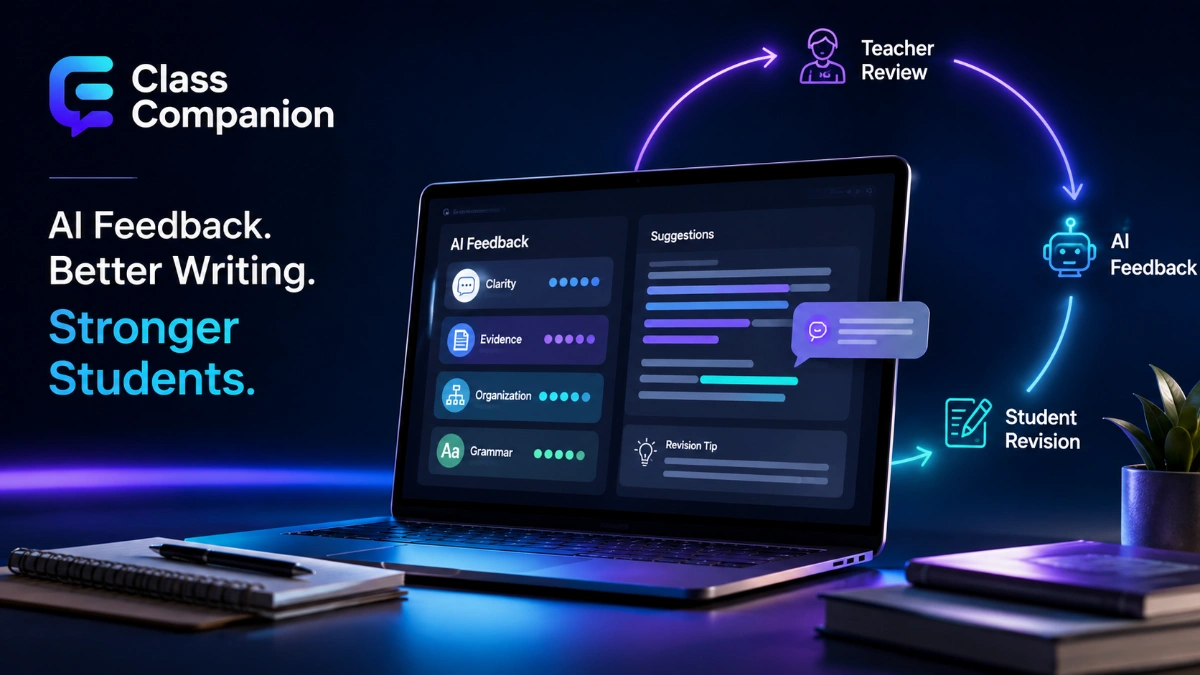

Class Companion is an AI-powered education platform that helps teachers give students fast, rubric-aligned feedback on assignments while keeping the educator involved in the grading and instructional process. For students, the main promise is immediate feedback and repeated chances to improve; for teachers, the value is reducing the first-pass workload on written responses, surfacing class-level patterns, and providing AI tutoring during practice. The platform currently offers a free plan for individual teachers, with additional school and district capabilities available through paid plans.
What Class Companion Is
At its core, the platform is a classroom feedback, scoring, tutoring, and assignment system built around formative practice. Teachers can create or import assignments, define rubrics and scoring criteria, invite students, and decide how much AI support is available. Students submit responses and can receive feedback or scores quickly, then revise when multiple attempts are enabled.
The product publicly launched on October 5, 2023, alongside a $4 million seed round led by Index Ventures. Panorama Education acquired the company on April 23, 2025. The service continues to operate as a teacher-facing product, while Panorama also offers a district-oriented product called Solara with Class Companion.
This distinction matters because an individual educator can still use the standalone teacher product without adopting Panorama’s broader district platform. Solara with Class Companion is aimed at K-12 organizations that want classroom feedback capabilities combined with Panorama’s district-managed AI Environment, student data, and instructional insights.
How Class Companion Works
The workflow is designed around a feedback-and-revision loop rather than a one-time AI grade. A typical assignment moves through six main steps.
- The teacher creates or imports an assignment. Teachers can build an assignment from scratch, use AI generation tools, upload or paste existing material, or select content from the public library. Current plan information lists short answer, essay, and multiple-choice formats among the supported options.
- The teacher defines how the work should be evaluated. Custom rubrics and question-specific scoring criteria tell the AI what to look for. The company’s guidance recommends clear, specific criteria because rubric design directly affects how effectively the system interprets the teacher’s expectations.
- The teacher configures assignment settings. Depending on the activity, the educator can allow multiple attempts, enable or disable the AI tutor, set timers or due dates, control pasting, and configure other assignment conditions.
- The student submits a response. The platform evaluates the response using the assignment instructions and scoring criteria. Students may receive feedback, scores, or both, depending on the activity setup.
- The student revises when another attempt is available. Instead of waiting for a final grade before learning what went wrong, the student can use the feedback while the task is still fresh and submit an improved response.
- The teacher reviews performance and patterns. Dashboards can surface individual submissions as well as information about strengths, areas for growth, engagement, retries, disputes, and other performance indicators.
The important distinction is that the AI does not need to become the final instructional authority. The educator still designs the task, determines the rubric, chooses the settings, reviews student performance, and decides how the resulting scores or feedback should be used.
Core Class Companion Features
The platform combines several capabilities that are often separated across education tools: assignment creation, rubric-driven feedback, tutoring, revision, insights, accommodations, and response-integrity signals.
Instant AI Feedback and Scoring
The platform can provide feedback connected to the rubric or criteria attached to an assignment. That gives students something more actionable than a generic writing comment because the response can be linked to the performance expectations the teacher actually selected.
Teachers can create custom rubrics rather than relying exclusively on prebuilt scoring frameworks. The company’s rubric documentation recommends breaking complex expectations into clearer criteria and using precise scoring definitions to help the AI interpret them consistently.
Ditto, the Class Companion AI Tutor
Ditto is the name used for the platform’s built-in AI tutoring experience. The tutor is intended to support a student during an assignment without simply supplying the answer. Current documentation says teachers can enable or disable the AI tutor for an individual assignment and can view a student’s complete conversation history with it.
That per-assignment control is useful because AI assistance is not appropriate in the same way for every task. A teacher could allow tutoring during practice or revision while disabling it on an assessment intended to measure unaided reasoning.
Multiple Attempts and Revision
Multiple attempts are central to the platform’s formative-learning model. Teachers can allow students to retry questions after receiving feedback rather than making every submission a one-chance assessment.
For writing, this creates a particularly useful cycle. A student can clarify an argument, strengthen evidence, fix organization, or address a missed rubric criterion while the original task is still active rather than receiving comments after the class has already moved on.
Assignment and Student Insights
The free product includes basic insights, while premium plans add more detailed reporting. Current help documentation says student reports can include common feedback, median scores, retry rates, dispute activity, and AI-generated observations about strengths and weaknesses. Premium reporting includes additional progress information.
For teachers, that can shift the focus from simply asking, “Which students lost points?” to a more useful instructional question: “Which concept or rubric criterion is the class collectively struggling with?”
Student Accommodations
Current plan documentation lists accommodations including speech-to-text, text-to-speech, translation, extended time, and adjustable reading levels. The AI tutor documentation also says supported accommodations such as translation and text-to-speech can be used with the tutoring experience.
Class Companion for Teachers
For educators, one of the strongest use cases is high-volume formative assessment. A class can generate dozens of essays or short responses from a single activity, making detailed, immediate feedback difficult to provide manually.
The AI can handle part of that first feedback cycle, allowing the teacher to devote more attention to exceptions, disputed evaluations, reteaching, individual conferences, or responses that genuinely require human judgment.
That does not mean teachers should treat AI-generated evaluation as infallible. The company’s current help documentation explicitly acknowledges that submitting the same answer can sometimes produce different scores because AI outputs contain variability.
This is an important limitation rather than a minor technical detail. A clear rubric can improve alignment, but it does not turn an AI system into a perfectly deterministic grader.
For higher-stakes work, educators should therefore establish clear rules about when AI feedback is appropriate and how much human review is required. The tool can increase teacher capacity, but the consequential judgment should remain proportional to the stakes of the assessment.
Class Companion for Students
The student experience begins with a teacher invitation. Students can join a class and view available assignments from their dashboard. Depending on how an activity is configured, they may receive feedback, scores, tutoring, or opportunities to submit another attempt.
The most distinctive benefit is immediacy.
A student does not necessarily have to wait several days to discover that a claim lacks evidence, an explanation missed part of the rubric, or a response needs more development. If retries are available, the student can act on that information within the same learning cycle.
Students can also dispute feedback. Current documentation says teachers can view a student’s proposed score and comments, while the plan information describes a dispute-and-resolution process in which educators can accept or overrule a dispute.
Used well, that interaction can itself become a learning exercise. A student who disagrees with an evaluation can be asked to compare the response with the rubric and explain why the work satisfies the stated criterion.
Subjects, Grade Levels, and Assignment Types
The company says the platform supports subjects including English, Science, Social Studies, and World Languages, with grade levels ranging from kindergarten through higher education.
Its clearest differentiator is open-ended work such as essays and short answers, where students can benefit from explanations, rubric alignment, tutoring, and revision rather than merely being told whether an answer was correct.
Multiple-choice questions are also supported, but instant scoring alone is not unusual in education software. The more distinctive use case is an assignment requiring reasoning, evidence, explanation, or iterative improvement.
Not every form of assessment will be equally suitable for AI evaluation. Activities that depend on evidence the system cannot reliably access or interpret may require a different workflow or more direct teacher assessment.
Free vs. School and District Plans
Individual teachers can use the platform for free. The paid School/District offering adds deeper integrations, administration, analytics, standards tools, integrity features, organizational support, and other premium capabilities. The company does not publish a standard school or district price on its plans page and instead directs organizations to book a demo.
| Feature area | Free Teacher plan | School/District plan |
| Instant AI feedback and scoring | Included | Included |
| Basic insights | Included | Included, with premium insights |
| Public content library | Included | Included, plus private organization content |
| Google Classroom or Clever class/student import | Available | Available |
| Canvas and Schoology integration | Not listed for free | Available |
| Assignment and grade synchronization | Not included | Available |
| Pasted-text detection | Available | Available |
| Similar-response detection | Not included | Available |
| Typing-anomaly and copy/leave signals | Not included | Available |
| Standards alignment tools | More limited | Expanded |
| District administration, DPA, SSO, PD, and usage analytics | Not included | Available |
Current official LMS documentation states that free users can import classes and students from Google Classroom or Clever. Premium school and district accounts can work with Google Classroom, Clever, Schoology, or Canvas for classes, students, assignments, and grades, including grade synchronization back to the LMS.
For an individual teacher mainly interested in AI-assisted writing feedback, assignments, tutoring, and basic insights, the free plan covers significant functionality. The premium offering becomes more relevant when a school needs centralized administration, broader LMS workflows, expanded integrity signals, deeper analytics, or district support.
Academic Integrity and AI Detection
The platform provides response-integrity tools, but they are better understood as signals that help a teacher investigate than as conclusive proof of misconduct.
On the free plan, teachers can see text a student pasted into a response. School and district plans add signals including similar-response detection, typing anomalies, and copy-and-leave behavior.
The company itself advises teachers to evaluate student work individually when using these features rather than allowing an automated signal to make the final decision.
That distinction is important. Pasted text may have a legitimate source; leaving a browser tab does not automatically prove cheating, and unusual typing behavior is not equivalent to confirmed AI use.
Integrity indicators have the most value when they tell an educator which submission deserves closer human review.
Data Privacy and Student Information
The company’s privacy policy says it supports schools in complying with the Family Educational Rights and Privacy Act (FERPA), complies with the Children’s Online Privacy Protection Act (COPPA), does not sell personal information, and does not use personal information for advertising. The company also identifies itself as a Student Privacy Pledge signatory.
Schools should still perform their normal procurement, legal, and IT review.
Federal privacy positioning does not by itself resolve every question about retention, local policies, state requirements, contractual terms, data access, or a district’s specific implementation. The company provides a privacy packet and state-specific Data Privacy Agreement materials for organizations conducting that review.
Teachers and administrators should also distinguish between the standalone teacher service and district deployments connected with Panorama systems because integrations and data environments can differ by implementation.
What Solara With Class Companion Changes
Panorama Education acquired Class Companion on April 23, 2025. On October 28, 2025, Panorama announced the launch of Solara with Class Companion, combining real-time, rubric-aligned classroom feedback with Panorama’s district-oriented AI and instructional data environment.
For district customers, the goal extends beyond faster feedback. Solara with Class Companion is positioned as a way to connect classroom learning activities with district-managed resources, broader student data, progress information, and instructional insights.
For individual teachers, the acquisition did not eliminate the standalone offering. The current product continues to promote a free teacher plan, while Panorama markets Solara with Class Companion for broader K-12 deployments.
Strengths and Limitations
The platform is strongest when a teacher wants students to practice, receive timely feedback, and revise work against explicit criteria.
Its main strengths include:
- fast rubric-aligned feedback;
- multiple attempts and revision;
- an assignment-controlled AI tutor;
- teacher and student insights;
- a substantial free plan for individual educators;
- premium LMS and organizational integrations;
- accommodations;
- response-integrity indicators.
The limitations matter just as much.
AI scoring is not perfectly consistent, so teachers should not assume identical responses will invariably produce identical evaluations. Rubric quality influences the usefulness of feedback. Some administration, LMS, integrity, and reporting capabilities require a school or district plan, and paid pricing is not publicly listed.
The platform also should not be treated as a universal evaluator for every type of learning evidence.
A sensible implementation is selective: use AI where immediate feedback improves the learning cycle, define the criteria carefully, review results in proportion to the consequences, and retain human judgment for important assessment decisions.
Read more: What Is Class Companion? A Complete Guide to AI Feedback, Tutoring, and Classroom Use
Is Class Companion Worth Using?
For teachers who regularly assign essays, short answers, document-based questions, explanations, reflections, or other open-ended work, the platform is worth evaluating because it addresses a genuine constraint: students can benefit from more feedback and more practice than one teacher can always provide immediately.
The free teacher plan also makes it possible to test the workflow before a school considers a larger deployment. An educator can assess whether the generated feedback matches the rubric, whether students use revision opportunities constructively, and whether the tool reduces workload in that particular classroom.
School and district evaluation should go further. Administrators should consider LMS compatibility, privacy agreements, SSO, integrity features, analytics, professional development, data practices, and alignment with existing assessment policies.
The best reason to use the product is not simply that it uses artificial intelligence. Its real value proposition is shortening the cycle between student work, feedback, revision, and teacher response.
When that cycle is designed well, AI can support formative learning without replacing the educator.
Frequently Asked Questions
Is the platform free for teachers?
Yes. The platform currently offers a free plan for individual teachers and their students. Schools and districts can purchase a separate plan that includes capabilities such as deeper LMS integration, premium insights, expanded integrity tools, standards alignment, SSO, and administrative support.
What does the platform do?
It helps educators create assignments, deliver AI-generated feedback and scoring, offer AI tutoring, allow revision attempts, and view performance insights. Teachers determine the assignment design, rubric, and settings.
What is Ditto?
Ditto is the platform’s AI tutoring experience. It is designed to guide students during assignments without simply giving away answers, and teachers can enable or disable AI tutoring for individual activities.
Can teachers see student conversations with the AI tutor?
Yes. Current help documentation states that teachers can view a student’s full conversation history with the AI tutor.
Can students revise an answer after receiving feedback?
Yes, when the teacher enables multiple attempts. The ability to retry questions after feedback is one of the platform’s core formative-assessment features.
Does it integrate with Google Classroom, Canvas, or Schoology?
Yes, but integration depth differs by plan. Free users can import classes and students through Google Classroom or Clever. Premium school and district plans support broader synchronization with Google Classroom, Clever, Canvas, and Schoology, including assignments and grades.
Can it detect AI-generated or copied work?
It provides response-integrity indicators rather than definitive judgments. Free users can see pasted text, while paid school and district plans add signals including typing anomalies, copy-and-leave behavior, and similarity to other student responses.
Is it safe for student data?
The company says it supports FERPA compliance, complies with COPPA, does not sell personal information, and does not use personal information for advertising. Schools should still complete their own privacy, contractual, state-law, and district-policy review before deployment.
Who owns Class Companion?
Panorama Education acquired the company on April 23, 2025. The standalone teacher-facing product remains available, while Panorama also offers Solara with Class Companion for district-oriented use.
Does it replace a teacher’s grading?
No. It can provide feedback and scoring support, but AI evaluation can vary. Teachers remain responsible for rubric design, assessment policy, instructional decisions, and the level of human review appropriate to the assignment.