













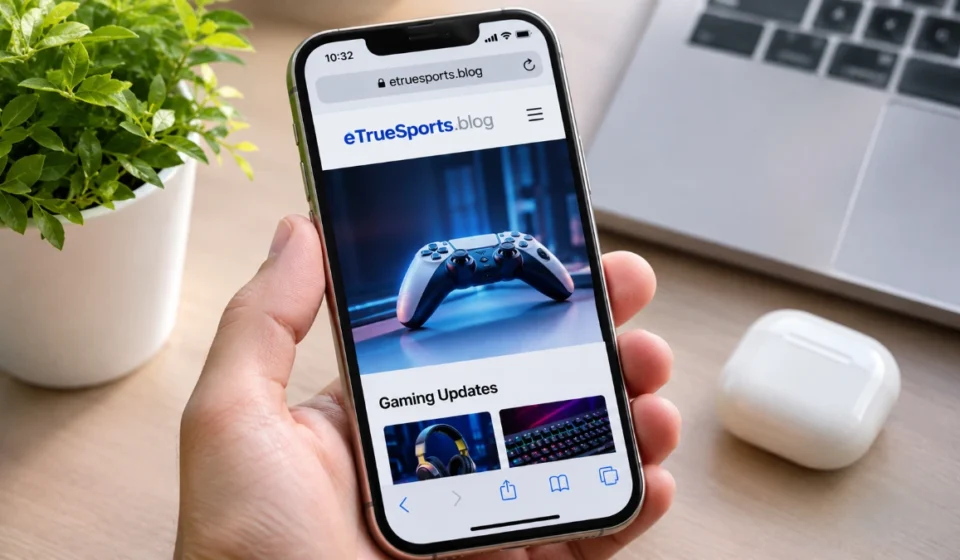

The eTrueSports iOS app has no independently verified official iPhone download or Apple App Store listing as of November 7, 2026. The publisher of eTrueSports states that it offers a mobile-friendly website rather than a dedicated iOS application. Although other websites discuss software called ETSiOSApp, those claims have not established an authenticated app release. If you want to access eTrueSports.blog on your iPhone, you can open the website in Safari and add it to your Home Screen without installing an unfamiliar application.
This distinction is important because online articles sometimes describe ETSiOSApp versions, updates, and features as though the software were already available. However, a published description is not proof that an official application exists.
For iPhone users, the safest practical approach is to use a website whose address and publisher you can verify, rather than trusting an unconfirmed download link.
Is eTrueSports Available on the Apple App Store?
An authenticated eTrueSports iOS application listing has not been established through the available research. This does not prove that no similarly named application exists in any regional App Store.
In an article dated August 19, 2026, eTrueSports.blog explains that it does not offer an official iOS application. Instead, the publisher identifies its service as a website that iPhone users can access through a browser.
Other websites using the eTrueSports name discuss ETSiOSApp downloads and features. However, the ownership relationship between those publishers and eTrueSports.blog remains unverified. Their claims should not automatically be treated as announcements from the same organization.
If you find an application claiming to represent eTrueSports, check the following before downloading it:
- App Store listing: Look for a genuine Apple App Store product page.
- Developer identity: Check the developer’s name and whether the relevant publisher acknowledges it.
- Publisher confirmation: Look for a matching announcement or download link from an authenticated website.
- App information: Review the description, privacy details, and requested permissions.
You can search the App Store for “eTrueSports” or “ETSiOSApp,” but remember that availability can vary by country or region. A similar name or recognizable icon alone does not establish an official connection.
How to Access eTrueSports on an iPhone
You do not need a dedicated application to browse eTrueSports.blog on your iPhone.
Follow these steps:
- Open Safari on your iPhone.
- Tap the address bar.
- Enter https://etruesports.blog/.
- Tap Go to load the website.
- Browse the available pages directly through Safari.
Apple’s official Safari browsing guide explains how to open websites, navigate pages, and manage browser tabs.
Before entering passwords or other personal information, check the website address carefully. Search results and familiar-looking page designs do not guarantee that a website belongs to the publisher you intended to visit.
How to Add eTrueSports to Your iPhone Home Screen
If you regularly visit eTrueSports.blog, you can create a Home Screen icon for faster access.
- Open the website in Safari.
- Tap the Share button.
- Select Add to Home Screen. You may need to scroll through the available actions.
- Change the shortcut name if you prefer.
- If Open as Web App appears, select the setting you want.
- Tap Add.
Apple provides these instructions in its guide to adding websites to the iPhone Home Screen.
The available options can vary depending on your iOS version and the website’s capabilities.
Once added, the icon lets you return to the website without typing its address each time. However, a Home Screen shortcut is not evidence that an official native eTrueSports application has been installed.
eTrueSports Website vs. Native iOS App: What’s the Difference?
A native iOS application is software developed for Apple’s operating system. A mobile-friendly website is accessed through a browser, although some websites also support web-app functionality.
Readers exploring etruesports tech may encounter both terms. Understanding the distinction helps prevent ordinary website functionality from being mistaken for confirmed ETSiOSApp features.
| Feature | Native iOS application | Mobile-friendly website |
| Access | Typically installed through the App Store | Opens through Safari |
| Home Screen icon | Usually included | Can be added through Safari |
| Updates | Uses supported application update methods | Website content updates through the server |
| Offline functionality | Depends on the application | Depends on website implementation |
| Permissions | Managed through iOS controls | Managed through browser and website controls |
Neither format automatically guarantees stronger privacy, better performance, or offline access.
Likewise, a Home Screen icon does not confirm that eTrueSports offers native push notifications, live streaming, or other application-specific capabilities.
ETSiOSApp Versions, Updates, and Release Claims
Online searches for etsiosapp version from etruesports often reflect users’ attempts to identify the latest application release. However, no authenticated ETSiOSApp version number or independently verifiable release history has been established.
The phrase etsiosapp update by etruesports also appears in discussions of supposed software improvements. These descriptions should not be confused with confirmed App Store updates.
If you’re searching for etsiosapp how to update from etruesports, there is currently no verified official update procedure to follow.
Should an authentic application become available through Apple’s App Store, users can follow the developer’s instructions and Apple’s standard iPhone app update process.
Until an official release can be confirmed, avoid websites that insist you must install an unknown file, configuration profile, or special updater to access ETSiOSApp.
What About ETSJavaApp?
Some related searches concern ETSJavaApp, a separately named product, rather than an iOS application.
For instance, people searching how to update etsjavaapp by etruesports or etruesports etsjavaapp guide may be looking for installation and maintenance instructions. Neither search phrase establishes that the software has an authenticated release or a verified connection to an iPhone application.
Similarly, the etsjavaapp release date by eTrueSports does not establish a confirmed public release date.
Avoid following Java-related installation instructions when trying to install an iPhone app. Software intended for different platforms is not automatically compatible with iOS.
How to Avoid Fake eTrueSports App Downloads
An unfamiliar download claiming to be an official eTrueSports application deserves careful scrutiny, particularly when its developer cannot be connected to a verified publisher.
Before installing anything, take these precautions:
- Verify the developer: Compare the developer’s identity with information from the publisher’s authenticated channels.
- Avoid suspicious installers: Do not install unknown configuration profiles, APK files, or downloads advertised as special iPhone installers.
- Review permissions: Question requests for access to contacts, location, photos, or other sensitive information that the application’s purpose does not justify.
- Check privacy information: Look for a clear explanation of what personal information is collected and how it is used.
- Protect your Apple Account: Never enter your password or payment information into an unfamiliar app-verification page.
Searches for etruesports codes may also lead to websites advertising activation codes, exclusive access, or downloads. Such offers are not evidence that an official eTrueSports iPhone application exists.
Apple’s App Privacy Report helps iPhone users review certain permission usage and network activity associated with installed applications.
If you cannot establish who published a download or where it originated, avoid installing it.
Read more: eTrueSports iOS App: Availability, Download Options & iPhone Guide
Will eTrueSports Release an Official iOS App?
A dedicated iPhone application could become available in the future, but no independently confirmed launch date or development roadmap has been established.
The August 2026 statement from eTrueSports discusses the possibility of a future application without announcing a release schedule.
If an official app launches, look for an announcement from the relevant publisher, a verifiable developer identity, and an authentic installation source.
Until then, accessing eTrueSports.blog through Safari remains a practical option for iPhone users.
Frequently Asked Questions
Can I download the eTrueSports iOS app for free?
No independently authenticated official download or app pricing has been established. You can browse eTrueSports.blog through Safari without purchasing an application.
Why can’t I find ETSiOSApp in the App Store?
An official ETSiOSApp listing has not been independently verified. App Store availability can also vary by region, so missing search results do not establish worldwide unavailability.
Does the eTrueSports Home Screen shortcut work like an app?
It provides convenient access to the website. Depending on website support and iOS settings, it may open in an app-like window, but native application features and offline access are not guaranteed.
Is ETSiOSApp safe to install from a third-party website?
Its safety cannot be established without verifying the software and publisher. Avoid untrusted installers, suspicious configuration profiles, and downloads requesting unnecessary personal information.
Will eTrueSports release an iPhone app in 2027?
No independently confirmed 2027 release date has been established. Check authenticated publisher announcements for future updates rather than relying on speculative timelines.